Personal project
Case Intake and SLA Automation
An enterprise-inspired Salesforce support operations solution that standardizes case intake, automates routing, tracks business-hours-aware SLAs, sends proactive escalation notifications, and provides operational reporting for support teams.
Project context
Built as a portfolio project to demonstrate end-to-end Salesforce Administrator and Developer skills through a realistic support-operations use case. The solution combines declarative automation, Apex, data modeling, reporting, and business analysis.
Business problem
Support teams can struggle with inconsistent intake, manual routing, poor visibility into approaching SLA deadlines, reactive escalation management, and limited operational reporting. The project was designed to centralize intake and automate the support lifecycle while giving case owners and leadership clearer visibility into workload and SLA risk.
Users and stakeholders
- Internal users submitting support requests
- External customers submitting cases
- Support agents and case owners
- Support managers
- Leadership reviewing operational performance
- Salesforce administrators maintaining the solution
Solution
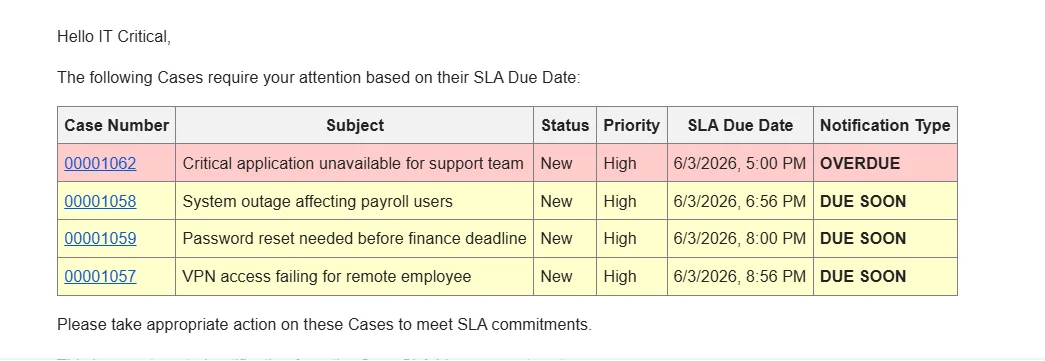
Built a centralized case-management system with Screen Flow for guided internal intake and Web-to-Case for external submissions. Cases are automatically routed by Request Type, Priority, and Department, assigned a business-hours-aware SLA due date, and monitored hourly through Scheduled Apex. Case owners receive consolidated Due Soon and Overdue notifications, while reports and a dashboard provide visibility into workload, SLA risk, and resolution performance.
Architecture and process
- Internal users submit requests through Screen Flow, while external customers use Web-to-Case.
- A Record-Triggered Flow applies routing rules and assigns the appropriate queue.
- SLA due dates are calculated from Request Type configuration using Salesforce Business Hours.
- Scheduled Apex runs hourly and queries eligible open cases.
- SlaNotificationService classifies cases as Due Soon or Overdue, groups them by owner, and builds consolidated notification emails.
- Successful email delivery updates notification flags to prevent duplicate alerts.
- Case and SLA data feed operational reports and the Support Operations SLA Dashboard.
Key features
- Guided internal case intake using Screen Flow
- External intake through Web-to-Case
- High-priority description validation
- Request Type and priority-based queue routing
- IT Critical escalation path
- Business-hours-aware SLA due-date calculation
- Four-business-hour Due Soon threshold
- Hourly SLA monitoring
- User-owned and queue-owned case support
- Consolidated owner notification emails
- Email success tracking
- Resolution-hours tracking
- Six operational reports
- Support Operations SLA Dashboard
Technical decisions
- Used declarative Flow for guided intake, routing, and other automation where it was a good fit.
- Refactored SLA notification monitoring from Scheduled Flow to Scheduled Apex after identifying scalability, scheduling, maintainability, and user-experience limitations.
- Used a service-layer architecture to separate scheduling from SLA notification business logic.
- Bulkified SOQL, DML, and email processing to remain governor-limit safe and support higher case volumes. This is an architectural design goal, not a claim of verified performance at thousands-of-cases scale.
- Grouped notification emails by owner rather than sending one email per case.
- Used the Business Hours API instead of raw clock-time calculations so SLA monitoring respects non-business hours.
- Updated notification flags only when email sending succeeds.
- Kept User and Queue owner handling separated where their notification behavior differed.
Testing and validation
- Apex unit tests using @TestSetup
- Positive and negative assertions
- User-owned Due Soon and Overdue cases
- Queue-owned Due Soon and Overdue cases
- Closed-case exclusion
- Already-notified-case exclusion
- Missing SLA-date handling
- Far-future SLA handling
- Queue-without-email handling
- Empty-result handling
- Scheduler invocation testing
- System.runAs() used where needed to avoid mixed-DML issues
- Business Hours calculations tested against the same logic used by the implementation
Challenges
- Determining when declarative automation was no longer the best fit for SLA monitoring
- Supporting both User-owned and Queue-owned cases
- Consolidating multiple cases into a single notification per owner
- Calculating SLA risk using business hours rather than elapsed clock time
- Preventing duplicate notifications while only marking successful sends
- Designing the implementation to handle larger case volumes within Salesforce governor limits
Lessons learned
- Declarative-first does not mean Flow should be used for every problem; Apex can be the better choice when scheduling, scale, grouping, or testability requirements become more complex.
- Salesforce business logic must account for platform constraints such as governor limits, ownership types, business hours, and email behavior.
- Good Salesforce solutions combine technical implementation with user experience and operational visibility rather than solving only the automation requirement.
- Refactoring an early implementation can produce a cleaner and more scalable architecture than forcing the original approach to work.
Future improvements
- Slack or other real-time notification channels
- Priority-specific Due Soon thresholds
- Multiple regional Business Hours configurations
- SLA pause/resume behavior for statuses such as Waiting on Customer
- Custom Metadata-driven SLA threshold configuration
- Experience Cloud customer intake
- Lightning Web Component enhancements
- Integration with external ticketing or knowledge systems