Training project
LWC Contact Manager
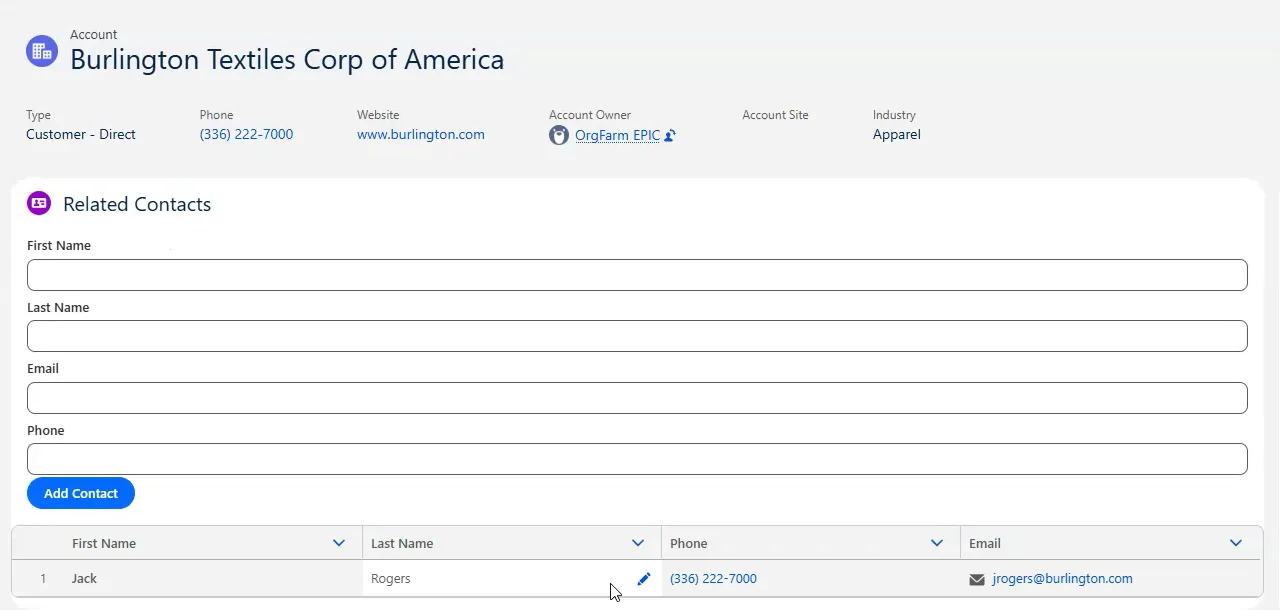
A Salesforce contact-management interface that brings related contact viewing, contact creation, and inline editing onto an Account record page using parent and child Lightning Web Components backed by Apex.
Video walkthrough
Project demo
Project context
Originally completed as the final project for Igor's Learn LWC course. I applied concepts from the course and extended the project by converting the contact table into an editable datatable and refactoring the input handling from multiple field-specific handlers into one dynamic handler. I used AI to write the test classes and project documentation.
Business problem
Salesforce users working with Account records may need to review and maintain related contacts while keeping the Account in view. The course project addressed this use case by bringing related contact information and common maintenance actions into one workspace. Users can review names, phone numbers, and email addresses, create contacts associated with the current Account, and submit edits from the same interface.
Users and stakeholders
- Salesforce developers learning Lightning Web Component architecture and communication patterns
- Salesforce users viewing and maintaining contacts associated with Account records
- Salesforce administrators adding the component to an Account record page
Solution
Built contactWorkspace as the parent Lightning Web Component for an Account record page, with contactInputForm as an embedded child component. The parent retrieves related contacts through ContactController and displays them in an editable lightning-datatable. The child collects contact details and creates a record linked to the current Account, then sends a custom event so the parent can append the submitted values to the table. Apex handles contact queries, inserts, and updates, while toast notifications communicate success and errors.
Architecture and process
- contactWorkspace receives recordId from the Lightning record page and calls ContactController.queryContacts() when the component connects.
- queryContacts() selects Id, FirstName, LastName, Email, and Phone for contacts associated with the current Account.
- The parent passes recordId to contactInputForm through its public accountId property.
- contactInputForm captures First Name, Last Name, Email, and Phone and calls ContactController.createContact().
- After a successful insert, the child dispatches a newcontact custom event containing the entered field values and clears the form.
- The parent appends the event data to its local contacts array without another query. The current event payload does not include the inserted Contact Id.
- Inline edits are collected as draft values and submitted together to ContactController.updateContacts().
- updateContacts() saves the submitted records and queries those records again. The parent replaces its displayed contacts with the returned subset and clears draft values.
- ContactController uses with sharing, WITH USER_MODE queries, and user-mode insert and update operations.
Key features
- Account-specific related contact retrieval
- Contact-creation form embedded in the Account record page
- Automatic association of new contacts with the current Account
- First Name, Last Name, Email, and Phone fields
- Inline editing through lightning-datatable
- Multiple record updates submitted in one Apex call
- Save and cancel handling for draft edits
- Child-to-parent communication through a newcontact custom event
- Immediate local table update after contact creation
- Form clearing after a successful insert
- Success and error toast notifications
- User-mode Apex queries and data changes
Technical decisions
- Separated the related-contact workspace and contact-creation form into parent and child Lightning Web Components.
- Passed the current Account Id into the child through an @api property and used a custom event to send newly entered contact values back to the parent.
- Used Salesforce base components for the card, input fields, button, and editable datatable.
- Extended the original course project by refactoring the contact table into an editable lightning-datatable.
- Replaced multiple field-specific input handlers with one dynamic handler that maps each input's name to the corresponding component property.
- Used imperative Apex calls for loading contacts, creating records, and saving draft edits.
- Collected inline edits into a list for a single update operation instead of issuing a separate call for each edited cell.
- Used with sharing and explicit user-mode database operations in ContactController.
- Wrapped insert and update DmlException errors in AuraHandledException so the component can display the database error message.
- Used AI to write the Apex test classes and project documentation, then included a shared TestDataFactory and @TestSetup to prepare reusable Account and Contact test data.
Testing and validation
- ContactControllerTest contains tests for contact queries, creation, and updates using @TestSetup and TestDataFactory.
- Query tests cover 251 seeded contacts, an Account with no contacts, and a null Account Id against the seeded test data.
- The successful-create test checks the saved field values and Account association.
- Update tests cover five edited contacts, a bulk update of 251 contacts, and an empty input list.
- A missing-LastName test is present, but it expects DmlException while the current controller wraps that exception in AuraHandledException. A passing result for the current suite has not been established.
- The uploaded demo shows contact creation, a success toast, cleared form fields, and the new contact appearing in the table in a Salesforce Developer Edition org.
- The repository's LWC Jest files are generated placeholders with trivial assertions and older component names; they do not establish tested component behavior.
- Current-branch Apex test execution results are awaiting Jeremy's confirmation; no code-coverage percentage is claimed.
Challenges
- The hardest part was implementing the changes beyond the original course project. I knew what I wanted the component to do, but needed to revisit earlier course exercises to work out how to convert the table into an editable datatable and consolidate the input logic into one dynamic handler.
Lessons learned
- The project provided an opportunity to apply concepts from the Learn LWC course in a complete parent-and-child component workflow, then extend the initial implementation through independent refactoring.
- Refactoring multiple input handlers into one dynamic handler reduced repeated code while preserving the same field behavior.
- Extending the table with inline editing required coordinating draft values, Apex updates, refreshed data, and user feedback across the component and controller layers.
- AI can accelerate test and documentation creation, but the generated work still needs to be reviewed against the current implementation.
Future improvements
- These were not planned features for the original project, but possible future development could expand it into a more complete Account Contact Workspace.
- Add more advanced contact filtering.
- Add bulk actions for related contacts.
- Add configurable display options.
- Show additional Account and Contact context in the workspace.
- Expand the automated test coverage.