Personal project
Weather Lightning Web Component
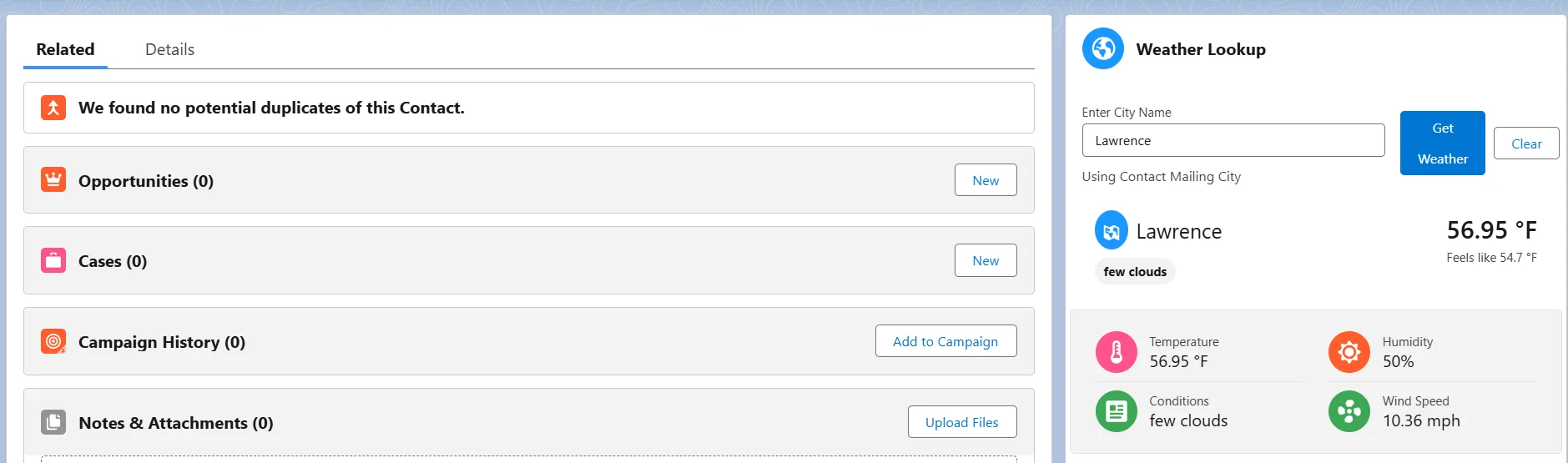
Built a record-aware Salesforce Lightning Web Component that retrieves and displays current weather data through Apex, automatically using an Account or Contact's city when available while still allowing manual searches.
Project context
Created as a personal Salesforce DX project to demonstrate Lightning Web Component development, Apex callouts, secure API configuration, record-aware behavior, testing, and responsive Salesforce UI design.
Business problem
Salesforce users may need location-specific weather information while working with Account or Contact records. Requiring users to leave Salesforce and manually search for weather adds context switching and repetitive work.
Users and stakeholders
- Salesforce users working with Account records
- Salesforce users working with Contact records
- Salesforce administrators configuring the integration
Solution
Built a reusable weatherCard Lightning Web Component backed by the WeatherSearchController Apex class. When placed on an Account or Contact record page, the component can detect the record's city and retrieve weather data automatically. Users can also search for another city manually. API communication is handled through Apex using a Named Credential and Custom Metadata configuration.
Architecture and process
- weatherCard receives recordId and objectApiName.
- When used on an Account, it reads BillingCity; when used on a Contact, it reads MailingCity.
- If a city is available, the component can automatically request weather data.
- Users can override the detected city through manual search.
- The LWC calls the cacheable WeatherSearchController.getWeatherByCity() Apex method.
- Apex performs the HTTP callout using the OpenWeather Named Credential.
- API configuration is read from Weather_Config__mdt.
- The response is parsed and returned to the LWC for display.
- Loading and error states are handled in the component UI.
Key features
- Record-aware behavior on Account and Contact pages
- Automatic city detection and weather retrieval when record data is available
- Manual city search and override
- Enter-to-search interaction
- Clear/reset action
- Responsive SLDS interface
- Current and feels-like temperature
- Weather conditions, humidity, and wind information
- Loading and error states
- Apex HTTP callout integration
Technical decisions
- Used Apex as the integration layer rather than making the external API request directly from the browser.
- Used a Named Credential for the OpenWeather endpoint rather than hardcoding the API host.
- Used Custom Metadata for API configuration and kept sensitive integration details out of the LWC code.
- Marked the Apex method @AuraEnabled(cacheable=true) for read-only retrieval behavior.
- Used with sharing on the Apex controller.
- Added dedicated success and error HttpCalloutMock implementations for deterministic Apex testing.
- Used Jest tests for LWC behavior in addition to Apex tests.
- Used Agentforce Vibes to help generate the LWC code, then manually reviewed, tested, and troubleshot the implementation rather than treating generated code as automatically correct.
Testing and validation
- WeatherSearchControllerTest for Apex controller and callout behavior
- WeatherServiceMock for successful HTTP responses
- WeatherErrorMock for negative-response paths
- Test.setMock(HttpCalloutMock.class, ...) to avoid external calls during tests
- Jest tests for the weatherCard Lightning Web Component
- Manual review and troubleshooting of the generated LWC code
Challenges
- Setting up the Named Credential and Custom Metadata was the most difficult part of the project. The integration required understanding how to keep endpoint and configuration details outside of the component code while still allowing the Apex controller to make the external callout correctly.
Lessons learned
- The project reinforced that security and configuration practices matter even for personal projects. Sensitive integration details should not be hardcoded simply because an application is small or experimental. It also reinforced the importance of reviewing AI-generated code, understanding what it is doing, and troubleshooting it rather than assuming generated code is correct.
Future improvements
- Improve location accuracy using state/country information or geocoding
- Add a five-day forecast
- Add Fahrenheit/Celsius preference
- Add condition icons
- Add configurable compact mode
- Use Platform Cache for repeated searches
- Add admin-configurable behavior
- Store optional weather snapshots against Account or Contact records
- Add automatic refresh when record location changes
- Improve localization and accessibility
- Expand Jest and Apex test coverage as features grow